iBloom for Kids: A Practical Guide for Parents and Teachers
Learn how to use iBloom worksheets, assessments and spelling practice with a clear weekly routine. Includes a free printable learning planner.
iBloom for Kids: A Practical Guide for Parents and Teachers
iBloom gives families and educators one place to choose a learning goal, open age-appropriate practice, check the result, and decide what the child should do next. The platform covers Math, English, assessments, printable worksheets, and spelling practice from early years through Grade or Class 5.
The useful question is not how many activities a child can finish. A good session should answer three smaller questions: What skill are we practising? What did the child understand? What is the next useful step?
This guide shows how to use iBloom around that cycle. It also includes a printable weekly learning plan that keeps the focus on a small number of purposeful sessions.
Free weekly iBloom learning plan
The planner below connects a goal to four short sessions. Each row asks the child or adult to name the skill, choose printable or interactive practice, and decide whether the skill feels secure or needs another attempt.
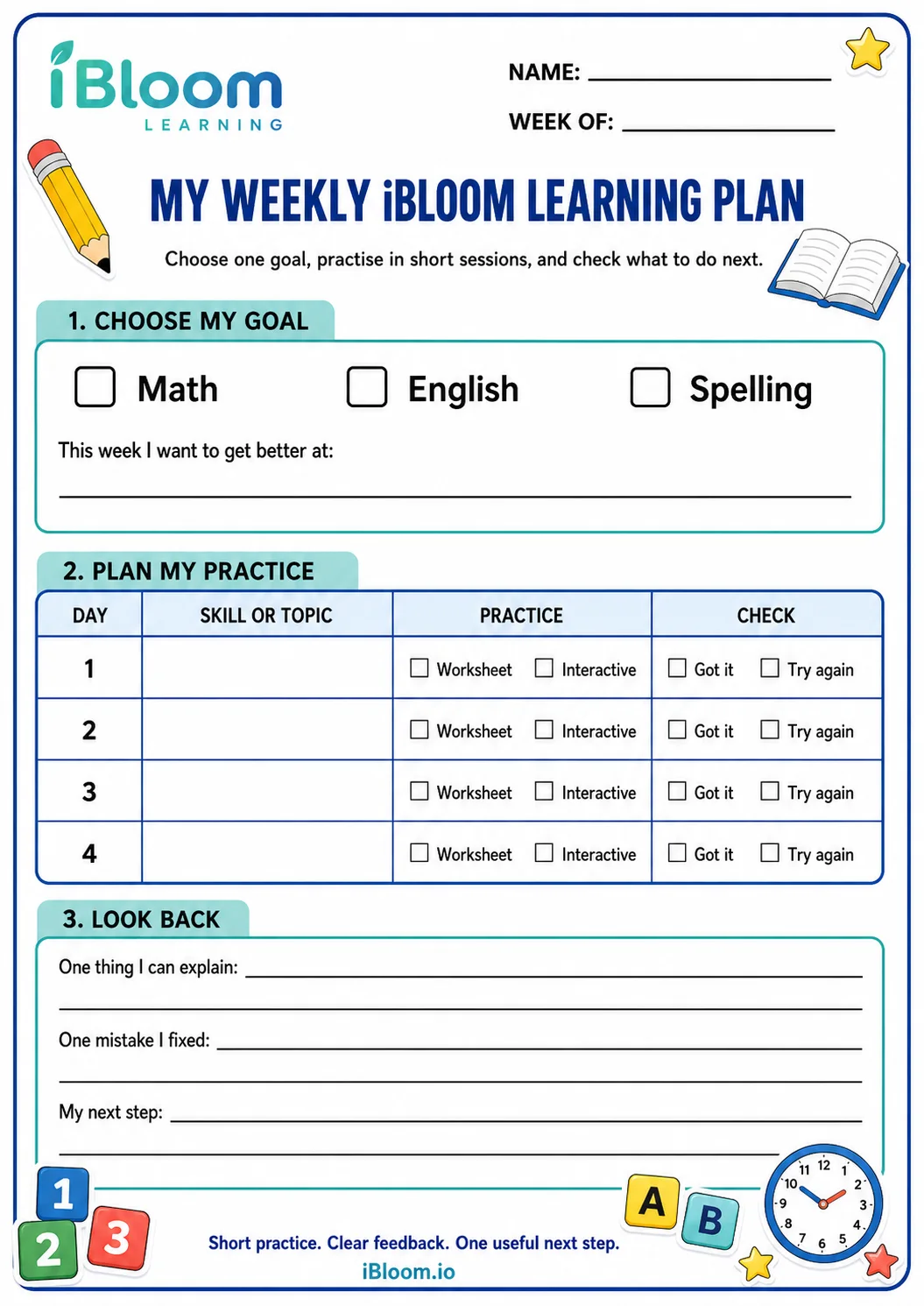
Download the free Weekly iBloom Learning Plan PDF
Print one copy for each child or learning group. Choose a single goal at the start of the week. Four completed sessions are not required. The plan still works if the child needs two careful sessions and a review day.
What can children do on iBloom?
Children can use iBloom for focused practice rather than a long block of screen time. A parent or teacher selects the grade, subject, topic, and skill. The child then completes a worksheet, lesson activity, assessment, or spelling task that matches the chosen goal.
The main areas serve different jobs:
| iBloom area | Use it when you need | A useful outcome |
|---|---|---|
| Learning | A guided path through Math or English skills | The child works on one defined concept |
| Worksheets | Interactive practice linked to a lesson or assigned by an adult | The child applies the skill and receives feedback |
| Printable worksheets | Paper practice for homework, review, or low-screen learning | The child shows work that an adult can discuss |
| Assessments | A short check across selected skills | The adult identifies strengths and gaps |
| SpellBee | Listening, spelling, and vocabulary practice | The child studies words through retrieval and correction |
You can browse the free printable worksheet library before creating an account, explore the worksheet generator, or read the complete onboarding guide if you want account-by-account instructions.
Start with one learning goal
A broad goal such as “improve maths” gives an adult little guidance. Choose a skill that can fit into one or two weeks:
- read and compare numbers to 100;
- subtract within 20 using drawings;
- identify the main idea in a short passage;
- write a paragraph from ordered hints;
- spell words with a target vowel pattern.
Write the goal in language the child can repeat. “I am learning to explain how I found the answer” works better than a curriculum label copied from a menu.
The adaptive learning guide explains how the level of practice can change while the learning goal stays clear. The adult still chooses the destination and checks whether the activity supports it.
Build a short iBloom session
A useful session can take 15 to 25 minutes. Young children may need less. Stop while the child can still describe the work without frustration.
1. Preview the goal
Tell the child what they will practise and what success will look like. For subtraction, success might mean drawing the quantities and explaining which amount remains. For reading, success might mean answering one question with evidence from the passage.
2. Let the child attempt the task
Give enough quiet time for a first attempt. Avoid correcting each step as it happens. The first attempt helps you see whether the child understands the idea, misreads the directions, or needs a smaller starting point.
3. Read the feedback together
Feedback should lead to an action. The Education Endowment Foundation's feedback guidance recommends feedback that focuses on the task, the subject, and strategies the learner can use. A score alone does not explain how to improve.
Ask one of these questions after a task:
- Which answer can you explain with confidence?
- Which step changed when you tried again?
- Is the error about the idea, the calculation, or the directions?
- What example should we practise next?
Use the Mistake Detective worksheet when the child needs a calm routine for inspecting an error.
4. Record one next step
Finish with one sentence. Examples include “practise two more questions with number blocks,” “reread the question before choosing,” or “review these five spelling words on Thursday.” A next step gives the following session a clear starting point.
Match the plan to the child's stage
iBloom uses regional grade labels so families and schools can select the level they recognise.
Early years
US families will see Pre-K and Kindergarten. India uses LKG and UKG. UAE uses KG1 and KG2. At these stages, keep sessions brief and concrete. Use pictures, counters, letter tiles, tracing, and spoken explanations. A child may answer by pointing or drawing before writing.
Grade or Class 1 and 2
Choose one small skill and repeat it through different formats. A child might model addition with objects, complete an interactive worksheet, and then solve two paper questions. In English, the same word pattern can appear in reading, spelling, and sentence writing.
Grade or Class 3 to 5
Older learners can take more ownership. Ask them to write the goal, choose one practice format, and explain the result. Use an assessment when you need a broader check, then return to a focused worksheet for the skill that needs attention.
Grade labels help place a child near suitable content. The child's work provides better evidence than the label. Move to a clearer example when the task hides the concept, and add challenge when the child can explain the method without prompts.
A parent route through iBloom
Parents can use the platform without recreating a school day at home.
- Add the child and confirm the correct region and grade.
- Pick one Math, English, or spelling goal for the week.
- Choose one activity from the learning path or worksheet library.
- Let the child complete a short first attempt.
- Review one answer and write one next step on the planner.
Use printable practice when a child needs to draw, annotate, or work away from a screen. Use interactive practice when immediate response and independent navigation support the goal. A mixed routine often gives an adult more information than repeating one format.
The AI tutor guide for parents provides a separate checklist for tasks that involve generative AI.
A teacher route through iBloom
Teachers can begin with the lesson objective already planned for the class.
- Assign a common skill to the class, then adjust the amount or support for a smaller group.
- Use a short assessment to gather evidence before choosing the next worksheet.
- Give children time to explain one response instead of measuring progress by completed pages.
- Keep a paper option available for pupils who show their thinking better through drawing or annotation.
- Use SpellBee practice for a defined word set, followed by a correction round.
The EEF guidance notes that strong initial instruction reduces the amount of corrective feedback pupils need. iBloom practice works best after the teacher or parent has introduced the concept in clear language and modelled an example.
Use AI-supported learning with adult oversight
AI can help select or generate practice, but an adult should still check the learning goal, the age fit, and the child's response. UNICEF's current guidance on AI and children places safety, privacy, transparency, fairness, and children's best interests at the centre of child-facing AI.
Before a child starts, check four points:
- The activity asks for no unnecessary personal information.
- The directions match the child's reading level.
- The answer can be checked through a model, source, or adult explanation.
- The child knows they can stop and ask for help.
Keep the child's full name, school details, address, and private family information out of open prompts. Treat an AI response as material to inspect, not an unquestioned answer.
A seven-day starting plan
Use this sequence for a first week:
Day 1: Choose one skill and complete a small diagnostic or first worksheet. Record the type of support the child needed.
Day 2: Teach or model one missing step. Let the child solve a similar example without copying the model.
Day 3: Change the format. Move from interactive work to paper, or from a worksheet to a spoken explanation.
Day 4: Return to the original skill with fewer prompts. Ask the child to compare the first attempt with the new one.
Day 5 or the weekend: Review the weekly planner. Keep the skill for another week, narrow it to one gap, or choose the next goal.
For a more playful version of the same routine, use the Home Learning Quest printable.
Signs that the routine is helping
Look for changes in the child's work and explanation:
- the child starts with less prompting;
- the child notices an error and chooses a correction strategy;
- the child can explain the method with an example;
- the child applies the skill in a new question or format;
- the next practice choice becomes more specific.
Progress may look uneven. A child can answer one format with confidence and struggle when the wording changes. Keep examples from different sessions so you can compare the reasoning, not only the scores.
Frequently asked questions
Is iBloom only for independent child use?
No. Children can complete suitable tasks on their own, while parents and teachers choose goals, assign work, review results, and plan follow-up. Adult involvement is useful when a child is learning a new concept or does not understand the feedback.
Does every session need an assessment?
No. Use assessments when you need a wider check across skills. A focused worksheet, a spoken explanation, or one worked example may provide enough evidence for the next lesson.
Should we choose printable or interactive worksheets?
Choose the format that helps the child show the target skill. Printable pages support drawing and written working. Interactive tasks can provide immediate responses and make independent practice easier. The weekly planner includes both options.
How many skills should a child practise in one week?
Start with one primary goal. A second familiar activity can act as a warm-up, but avoid filling the week with unrelated tasks. Depth gives the child time to apply feedback.
Where should a new family begin?
Browse the free worksheet collection, choose the correct regional grade, and open one activity that matches a current school or home-learning goal. The iBloom onboarding guide covers account setup and navigation.
Keep the routine small and observable
iBloom is most useful when an adult connects each activity to a clear purpose. Choose one goal, let the child attempt suitable practice, discuss the feedback, and record one next step. The weekly planner turns that cycle into a routine that families and teachers can repeat without filling each day with extra work.